
Free 7-step checklist and PDF
Gmail, Yahoo and Microsoft sender rules: do you meet them?
For: anyone sending marketing email in volume who wants to know they pass. A sender who heard about the 2024 rules, a team whose mail started going to spam, or a developer asked "are we compliant?"
- The seven checks, open on this page, no sign-up needed to read them.
- The three providers' rules side by side, in one table.
- Your ticks and your row as a PDF, with the rules table to print.
The 60-second answer
Since February 2024, Gmail and Yahoo ask five things of bulk senders: SPF and DKIM with DMARC aligned, one-click unsubscribe honored within two days, a spam rate under 0.3 percent, valid reverse DNS on sending IPs, and TLS.
Aim for a spam rate under 0.1 percent. 0.3 percent is where Gmail and Yahoo start filtering, deferring and blocking.
Microsoft tightened the same authentication rules for Outlook and Hotmail addresses in 2025. Its complaint line is 0.3 percent too, with under 0.1 percent needed in practice.
Every explanation on this page comes from the Email Almanac, our own library of more than 4,000 answers about email. You do not have to buy anything to read it.
- You get one email.It comes from Review My Emails, with the PDF link inside.
- Your PDF opens with your ticks.Every step you ticked is marked on it.
- Nothing else, unless you ask.No newsletter unless you tick the box. Unsubscribe in one click, any time.
The guide
The check, in 7 steps
One line each. Tick them as you go. Open a step for the full explanation.
- 1
Why:the 5,000 a day adds up everything from the same sending domain, marketing and transactional together.
Read the full explanation
Gmail's rules apply to any domain sending 5,000 or more emails a day to Gmail addresses, and Yahoo enforces a matching line. The count adds up everything from the same sending domain, marketing and transactional together, not each campaign alone. Below the line, the same rules have become the floor for everyone.
- 2
Why:not your email marketing tool's bounce domain. In Gmail's Show original you want PASS beside SPF, DKIM and DMARC.
Read the full explanation
Publish SPF and DKIM, and make sure at least one of them aligns with the domain in your From address, not your email marketing tool's bounce domain. Misalignment is common when you send through an email marketing tool. To check, send a test to a Gmail address, open it and choose Show original. You want PASS beside SPF, DKIM and DMARC. Gmail can refuse bulk mail outright when SPF or DKIM is missing.
- 3
Why:the report address is how the daily reports reach you.
Read the full explanation
Publish DMARC at
_dmarc.yourdomain.comwith at leastp=noneand a rua address, so the daily reports reach you. - 4
Why:a missing or generic PTR can get mail refused outright, whatever your SPF, DKIM and DMARC say.
Read the full explanation
Each sending IP needs a PTR record pointing to a real hostname that points back to the same IP. Gmail, Yahoo and Microsoft all require it, and a missing or generic one can get mail refused outright, whatever your SPF, DKIM and DMARC say. The connection must use TLS.
- 5
Why:two headers, a visible unsubscribe link in the email as well, and every request honored within two days.
Read your headersThe one-click unsubscribe guide
Read the full explanation
Two headers on every marketing email,
List-UnsubscribeandList-Unsubscribe-Post: List-Unsubscribe=One-Click, a visible unsubscribe link in the email as well, and every request honored within two days. Our guide "One-click unsubscribe" takes you through it step by step. - 6
Why:one report per 1,000 delivered. Three reports on a 500-person list is 0.6 percent.
Read the full explanation
Under 0.1 percent, one report per 1,000 delivered, is the safe zone. 0.1 to 0.3 percent is a warning band with more mail sent to spam. Above 0.3 percent brings throttling and serious damage to your domain's reputation. Gmail counts it against delivered mail, as a rolling average. Small lists feel it most: three reports on a 500-person list is 0.6 percent.
- 7
Why:Gmail sends no report per complaint, only totals in Postmaster Tools.
Read the full explanation
Gmail: add your root domain to Google Postmaster Tools at postmaster.google.com and publish the TXT record it gives you. Data shows once you send a few hundred Gmail messages a day. Gmail sends no report per complaint, only totals there. Yahoo: its Complaint Feedback Loop reports each spam click from Yahoo and AOL users. Microsoft: SNDS shows each sending IP's status as green, yellow or red. JMRP, its feedback loop, runs inside SNDS since June 2026 and hides who complained, so you match each report through your own Message-ID. On a shared IP you may not be able to join SNDS yourself, so ask your email marketing tool whether it can share the data.
See every row of the table
What your ticks mean
| Where you are | Do this first |
|---|---|
| SPF, DKIM or DMARC is not in place | Fix authentication first. It is the line Gmail can refuse you on outright. Cleaning the list will not fix this. Check your records with our free SPF checker and DMARC checker, or ask the free SOS line |
| No reverse DNS, or no TLS | Ask whoever runs your sending IPs for a PTR that points back to the same IP, and for TLS. Without the PTR, mail can be refused whatever SPF, DKIM and DMARC say. Cleaning will not fix this either. Ask the free SOS line if you are stuck |
| No working one-click unsubscribe | Add both headers and honor every request within two days. Our guide "One-click unsubscribe" has the steps |
| Your spam rate is over 0.1 percent, or you do not know it | Find where the reports come from. They cluster by where the addresses came from and by campaign type. Set expectations at signup and send each reader only the emails they asked for. Then clean the list before the next send |
| No dashboards or feedback loops yet | Turn on Postmaster Tools, Yahoo's Complaint Feedback Loop, and SNDS with JMRP. Without them you cannot see the spam rate the rules measure |
| All ticked, and you send 5,000 or more a day | You meet the rules as the Almanac lists them. Check the dashboards weekly and act on any trend that shifts over two weeks, before a line is crossed |
| All ticked, and you send less, or you are not sure | Keep it that way. These rules are now the floor for every sender, and the 5,000 counts all your domain's mail together |
The rules side by side
| Rule | Gmail | Yahoo | Microsoft |
|---|---|---|---|
| Who it applies to | 5,000 or more a day to Gmail addresses | Above 5,000 a day | The Almanac does not list Microsoft's own volume line yet. Microsoft tightened its rules in 2025 |
| SPF, DKIM and DMARC | All three, DMARC at least p=none, with alignment | All three, with aligned From domains | The same rules, tightened in 2025 |
| One-click unsubscribe | Required | Required | Not in the Almanac yet |
| Spam rate | Under 0.1 percent target, 0.3 percent ceiling | Under 0.1 percent a day, never over 0.3 percent. Crossing it can bring sudden blocking | Under 0.1 percent in practice, 0.3 percent threshold, counted on Microsoft users only |
| Reverse DNS and TLS | Required | Required | Reverse DNS required |
| Where you watch | Postmaster Tools | Sender Hub and the Complaint Feedback Loop | SNDS and JMRP |
Miss the rules and it comes in stages: first more mail goes to spam, then 421 temporary deferrals, then 550 rejections. A few weeks of bad signals can take months of clean sending to undo.
See how it plays out for a real business
Worked example. Coral Seaforth runs email at Saltmarsh Outfitters (saltmarsh-outfitters.example). The weekly sale email goes to more than 5,000 Gmail readers on the day it is sent, so the rules apply. Coral sends a test to a Gmail inbox and opens Show original: SPF and DKIM say PASS, but there is no DMARC record at all. That is the row "SPF, DKIM or DMARC is not in place". Coral publishes DMARC at p=none with a report address and checks it with the free DMARC checker. Then the domain goes into Postmaster Tools. Two weeks later the spam rate there shows yellow, the warning band. That is the spam rate row. Gmail never says who complained, but Yahoo's feedback loop does, and its reports cluster on the addresses from last spring's giveaway form. Before the next send Coral uploads the list to Review My Emails. Every address comes back To Keep, To Monitor or To Suppress, with the reason in plain English.
Review My Emails
This card, for every address on your list.
You sign up, upload your list and get every address back with one decision and the reason, in plain English. Big lists take a while, so we email you when yours is ready.
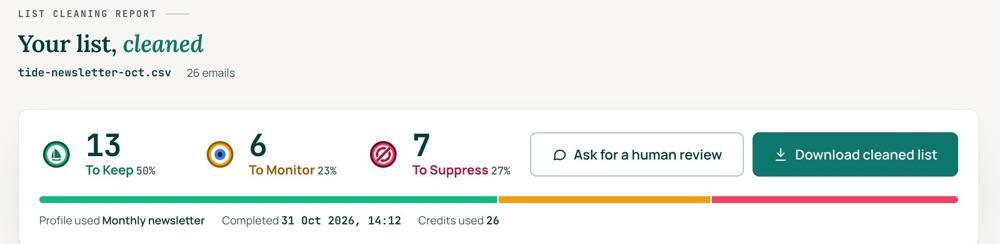
 To KeepSend to it.
 To MonitorSend carefully and watch what happens.
 To SuppressStop sending to it, and keep the record of who you stopped emailing.
Your first 1,000 are free
Create an account and your first 1,000 addresses are free. No card is needed to sign up. After that you pay for the size of your list, from $0.0080 an address down to $0.0026 at volume, with an $8 minimum. There is no subscription and no monthly minimum.
Human Review
If you want a person to look, ask for a Human Review from your report, and Yanna-Torry goes through your list herself.
Your next step. For the setup lines (SPF, DKIM, DMARC, reverse DNS, TLS and the unsubscribe headers), use the free tools: the SPF checker (reviewmyemails.com/tools/spf-checker), the DMARC checker (reviewmyemails.com/tools/dmarc-checker) and the email header analyzer (reviewmyemails.com/tools/email-headers). Cleaning will not fix any of these. Stuck? Ask the free SOS line at reviewmyemails.com/sos. A real person answers, with no pitch. If the line you miss is the spam rate, look at who you are sending to. Upload the list and clean your first 1,000 addresses free at reviewmyemails.com/get-started.
List cleaning does not fix SPF, DMARC, MX or blocklist problems. Those live in your sending setup, and they are a different job. A blocklist listing measures your sending, so it is never a reason to suppress anyone on your list. And nobody can promise you the inbox, so we do not.
Yanna-Torry Aspraki, Review My Emails
Email SOS Hotline, free
Stuck? We are here.
For those problems there is the Email SOS Hotline, our free help line. Tell Yanna-Torry what is going on and she will tell you what she would do. She reads every message herself and replies within 48 to 72 hours, with no pitch.
Ask the free SOS lineWords used
- Bulk sender
- a domain sending 5,000 or more emails a day to Gmail addresses
- Alignment
- SPF or DKIM passing for the same domain as your From address
- DMARC
- a DNS record that checks alignment and tells receivers what to do when it fails
- Reverse DNS (PTR)
- a record that maps a sending IP back to a hostname, which points back to the same IP
- Spam rate
- spam reports per delivered email, kept under 0.1 percent
- Feedback loop
- a provider telling you each time a reader clicks Report Spam
- Postmaster Tools, SNDS
- Gmail's and Microsoft's free dashboards for senders
Where this came from: the Review My Emails Email Almanac.
- What is DMARC?
- What are Google Postmaster Tools?
- How do I set up Google Postmaster Tools?
- What is Microsoft SNDS (Smart Network Data Services)?
- How do I sign up for Microsoft SNDS?
- What is an email Feedback Loop (FBL)?
- Why is processing FBL data important?
- Does Gmail have a traditional FBL? (Hint: Google Postmaster Tools)
- How to reduce user-level spam actions?
- Is reverse DNS optional for bulk senders?
- How does Gmail handle unauthenticated or poorly aligned mail?
- What does Gmail’s “bulk sender guidelines” mean for 2024+?
- What are Gmail’s complaint thresholds?
- How can Gmail’s reputation decay model affect small senders?
- What are Yahoo’s bulk sender requirements (2024)?
- What’s Yahoo’s complaint tolerance?
- What is the “Yahoo Complaint Feedback Loop” (CFL)?
- How to interpret Yahoo’s postmaster feedback?
- What are SNDS and JMRP, and how do they help?
- What are Microsoft’s complaint thresholds?
- What are the key requirements introduced by Gmail and Yahoo in 2024?
- Who do these requirements apply to? (Bulk senders definition)
- What authentication is required (SPF, DKIM, DMARC)?
- What are the requirements for easy unsubscribe?
- What is the spam complaint rate threshold?
- What are the consequences of non-compliance?
- How do I check if I'm compliant?
- How can B2B senders adapt to consumer-level compliance rules?
- How to use Gmail Postmaster and SNDS as change indicators?
- What’s the long-term impact of Gmail/Yahoo standardization?
 Trust beats tactics™
Founded in 2020, based in Bolton, United Kingdom.
reviewmyemails.com/resources/gmail-yahoo-microsoft-sender-rules?c=web-p10-r09pdf · v1